
VoiceStudio: Open-Source, Local-First Voice Cloning, Dubbing & Dictation
An ElevenLabs-style voice studio that runs on your own hardware.
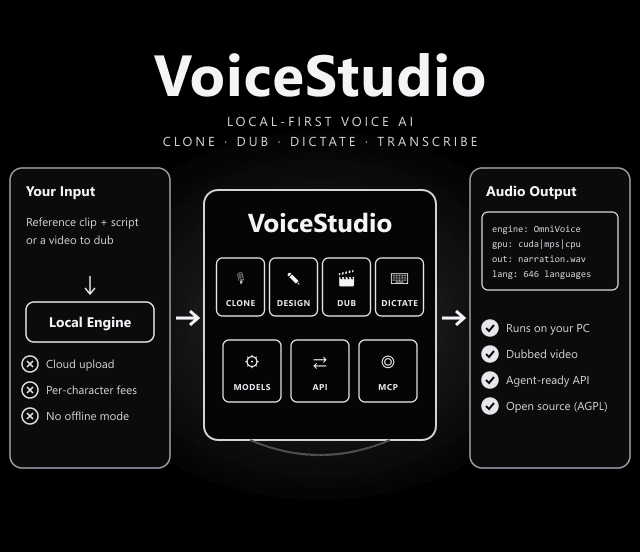
Clone or design a voice, dub videos with timed speech, dictate with a floating widget, transcribe audio and batch-produce audiobooks. The README says local workflows run on your machine, remote services are optional, and analytics need consent.
Your Voice. Your Workflow.
The app is organised into three groups of workspaces, according to the README:
Clone a voice from a clean reference recording, or design a new voice. Dictate anywhere with a floating widget.
Dub videos with timed speech, and turn scripts into stories, audiobooks and batch jobs.
Local API and MCP server for AI agents, reusable recipes, and watch folders for automation.
Hardware Support
What runs where, from the README. Hardware needs also vary by engine; the repo links a performance guide.
| Hardware | Support |
|---|---|
| NVIDIA GPU (Windows / Linux) | CUDA acceleration |
| Apple Silicon | Metal (MPS) acceleration |
| No dedicated GPU (integrated graphics, older PCs) | Fully usable on the CPU, slower. Installs the small CPU build of PyTorch (about 5 GB free disk). |
| Windows on ARM (Snapdragon X etc.) | Experimental: native ARM64 app, x64 Python backend under emulation, CPU only |
| Intel Mac | App UI only; connect to a remote backend |
Engines, Models & Integrations
| Component | What It Does |
|---|---|
| VoiceStudio engine (default) | Powered by k2-fsa/OmniVoice. Other engines can be chosen from the feature & engine catalog. |
| Model Manager | Downloads models when a workspace needs them and shows versioned model-source notices, evidence links and unresolved licence-review gaps. |
| Local speech API | Lets your own scripts and apps generate and transcribe audio locally. |
| MCP server | Exposes VoiceStudio as a tool to AI agents that speak the Model Context Protocol. |
| Agent skills | npx skills add debpalash/VoiceStudio: "voicestudio" for audio workflows, "voicestudio-maintainer" for repo maintenance. |
| Electron desktop app | The only desktop app and web UI. Version 0.5.3 was the final Tauri release; Tauri users must install Electron separately. |
Install (One Command)
curl -fsSL https://voicestudio.sh/install | sh
macOS and Linux. The installer keeps your settings, projects and models. Then open Voice cloning, add a clean reference recording, enter your text and generate; the app asks before installing a model.
irm https://voicestudio.sh/install | iex
curl -fsSL https://voicestudio.sh/install | sh -s -- --version X.Y.Z
git clone https://github.com/debpalash/VoiceStudio.git && cd VoiceStudio && bun install && bun run setup:api && bun run dev
curl -fsSL https://voicestudio.sh/install | sh -s -- --uninstall
Why Local Matters for Voice Work
Voice projects involve sensitive material: unreleased scripts, client recordings, your own voice. Running the models locally keeps that data on your machine and removes per-character cloud fees, which add up fast on audiobooks and long dubs. The trade-off is that you supply the hardware, and quality and speed depend on your GPU and the engine you pick.
Install With a Coding Agent
The README includes a prompt you can paste into Claude Code, Codex or Cursor. The linked agent guide covers hardware detection, reusing existing data, asking before model downloads, and a test generation, so an agent can set the app up and verify it end to end.
Before You Clone a Voice (Limits & Responsibilities)
VoiceStudio is powerful, which is exactly why these points matter:
- Consent first: The project says to clone voices only with permission. Cloning someone without consent can be illegal and harmful.
- Two licences, not one: AGPL-3.0 covers the app. Model weights, tokenizers, voices and generated-output conditions are licensed separately; a paid app licence does not grant those rights.
- No guarantee on commercial use: The Model Manager shows licence notices, but its reviewed-file preview "does not certify commercial permission". Check each model yourself.
- Platform gaps: Intel Macs run the UI only, and Windows on ARM is experimental and CPU-only.
Local workflows run on your hardware. Remote services are optional, and usage analytics require consent.
AGPL-3.0 for the application, including commercial use under its conditions. Models and voices have their own terms.
Website: voicestudio.sh · Releases: .dmg, .exe, .AppImage, .deb · Docs: engine guides, benchmarks, MCP and local API.
Frequently Asked Questions
Is VoiceStudio free?
The application is open source under AGPL-3.0, which allows commercial use under its conditions. The README stresses that model weights, tokenizers, voices and generated-output conditions are licensed separately, so check the licence of each model you download before commercial use.
Does VoiceStudio need a GPU?
No. NVIDIA GPUs (CUDA) and Apple Silicon (Metal) are accelerated, but the README says machines without a dedicated GPU are fully usable on the CPU, just slower. That setup installs a small CPU build of PyTorch and needs about 5 GB of free disk space.
Can AI agents like Claude Code use VoiceStudio?
Yes. VoiceStudio provides a local API and an MCP server, and the project offers agent skills via npx skills add debpalash/VoiceStudio. The README also includes a prompt you can paste into a coding agent to install and verify the app.
Is it legal to clone voices with VoiceStudio?
The project says to clone voices only with permission. Cloning someone else's voice without consent can break the law in many countries, so use your own voice, a contracted voice actor, or a voice you have the rights to.