
TokenEconomizer: Make Coding Agents Cheaper in the Repos You Use Every Day
Your agent forgets everything between sessions. TokenEconomizer remembers what it costs to forget.
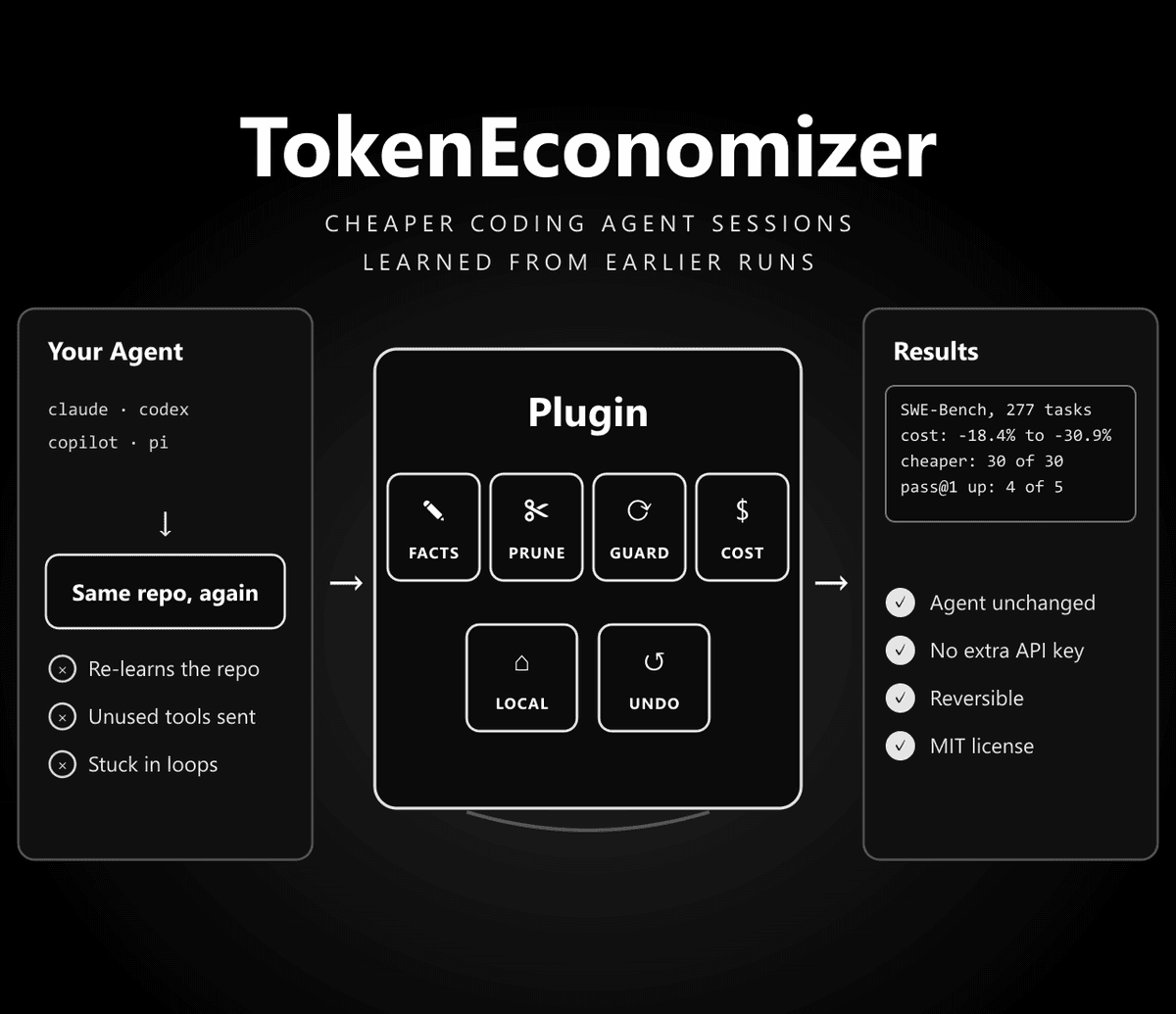
A research plugin that learns from earlier sessions in a repository, then trims repeated waste in the next ones: facts the agent keeps rediscovering, tools it never uses, and turns stuck in loops. The agent, its model and its code stay unchanged.
The Three Mechanisms
Each has its own switch. Defaults from the README:
Learns repository facts, such as "run tests with python -m pytest", from repeated failures and a periodic review. A fact is injected only after three sessions confirm it.
Leaves out tools unused over 10 prompts across 2+ sessions, or over 5 sessions, through the agent's own settings. One command restores them.
When a turn keeps hitting the same failures, a judge model checks whether it is stuck and, if at least 70% sure, adds one short redirect.
If a turn is still stuck after the redirect, it tells you how to interrupt it. Stopping is always your call.
Results per Agent and Model (Paper)
Cost change and Pass@1 change versus the same agent without the plugin, on SWE-Bench tasks. The plugin's own model calls are included.
| Agent + model | Cost · Pass@1 |
|---|---|
| Claude Code + Sonnet 5 | −23.6% · +1.3 |
| Claude Code + Opus 4.8 | −30.9% · −1.0 |
| Codex + GPT-5.6 Terra | −24.7% · +0.9 |
| Codex + GPT-5.6 Sol | −26.1% · +1.6 |
| Copilot CLI + Sonnet 5 | −18.4% · +2.6 |
Agent Support
| Agent | Status |
|---|---|
| Claude Code 2.1.300–2.1.329 | Supported; tool pruning removes single tools |
| Codex 0.153.1–0.171.0 | Supported; prunes capability packages (needs 0.141.0+ for hooks) |
| Copilot CLI 1.0.83–1.0.114 | Supported; prunes whole MCP servers |
| Pi 1.2.0–1.5.2 | Supported; no pruning (Pi loads only four tools) |
| opencode, Cursor Agent, Grok Build, Hermes, Antigravity CLI, Factory Droid | Experimental, with fewer features |
Install in Claude Code
git clone https://github.com/microsoft/TokenEconomizer.git && claude plugin marketplace add "$PWD/TokenEconomizer" && claude plugin install tokeneconomizer@tokeneconomizer
Needs Python 3.10+ on PATH and no API key of its own. Start claude in a repository, then run /tokeneconomizer:status and, once per machine, /tokeneconomizer:toolprune refresh-catalog. Keep the clone in place: the plugin runs from it.
codex plugin marketplace add "$PWD/TokenEconomizer" && codex plugin add tokeneconomizer@tokeneconomizer
copilot plugin marketplace add "$PWD/TokenEconomizer" && copilot plugin install tokeneconomizer@tokeneconomizer
pi install git:github.com/microsoft/TokenEconomizer
/tokeneconomizer:config set microskills=on
/tokeneconomizer:toolprune restore
TE_DISABLE=1 claude
Why Repeat Sessions Waste Tokens
Every turn resends the agent's instructions, every loaded tool definition and the conversation so far. Developers run the same agent on the same repository again and again, so the same facts get rediscovered, the same unused tools get sent and the same kinds of failing loops recur. TokenEconomizer treats a repository's sessions as one history instead of starting each from zero.
Built to Be Reversible
Facts form only from repeated evidence and are dropped when later sessions contradict them. Pruned tools come back with one command and are never removed again. The loop guard only redirects and informs you. Settings files it creates are kept out of git, and if any part fails, your session carries on as if the plugin were not installed.
Limits to Plan Around
From the README and the paper:
- Best on repeat work: Savings come from learning across sessions in the same repository. One-off tasks in new repositories saved less (6–20% on the security benchmarks).
- Research code: This is a research project with tested version ranges. Newer agent versions than those listed have not been tested yet.
- Micro-skills costs model calls: It is off by default because its fact proposer adds calls, and the payoff depends on the repository.
- Hidden notices in Claude Code: Plugin lines show only in the detailed transcript (Ctrl+O), so check what it pruned with the toolprune command.
arXiv 2610.22732, by authors from UC Berkeley, Microsoft Research and Microsoft Security. The experiments/ folder reruns the SWE-Bench and Web-Bench results.
What it learns stays on your machine in ~/.tokeneconomizer. It never handles credentials.
MIT License. Standard-library Python package with offline tests.
Frequently Asked Questions
Does TokenEconomizer need its own API key?
No. Its model calls, the fact proposer and the loop-guard judge, run through your own agent on the same plan or login, and their cost is included in its reports.
Which coding agents does it support?
Claude Code, Codex, the GitHub Copilot CLI and Pi are supported. opencode, Cursor Agent, Grok Build, Hermes Agent, the Antigravity CLI and Factory Droid are experimental, and some of them get only part of the features.
Can it make my agent worse at tasks?
It is designed not to: facts form only from repeated evidence, tools are removed only after going unused, and the loop guard leaves turns that are still making progress alone. In the paper, Pass@1 rose in 4 of 5 combinations and fell by 1.0 point in one (Claude Code with Opus 4.8).
How do I undo tool pruning?
Run the toolprune restore command (for example /tokeneconomizer:toolprune restore in Claude Code). It removes only the plugin's own entries, and tools you give back are not removed again.