
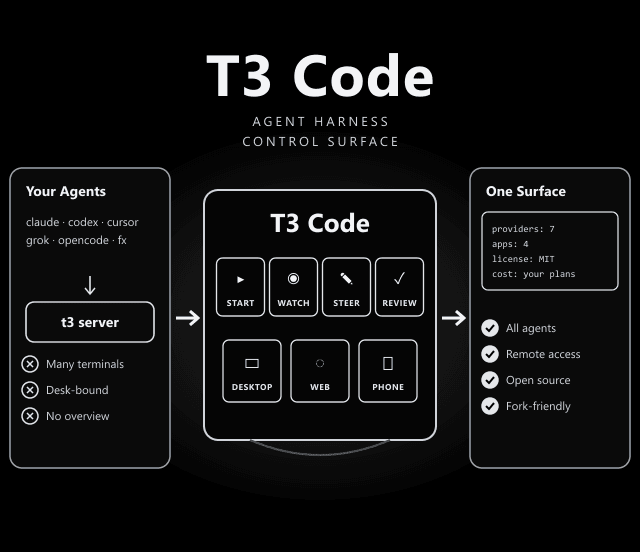
T3 Code: One App to Run Claude Code, Codex, Cursor & More From Desktop or Phone
T3 Code doesn't replace your coding agent. It gives all of them one home.
If Claude Code, Codex or Cursor are set up on your computer, T3 Code can control them from a desktop app, a web app, or your phone, using the subscriptions you already pay for.
How T3 Code Fits Together
Based on the README and docs, the setup has three layers:
Install and log in to at least one CLI, e.g. claude auth login or codex login. Antigravity needs no CLI.
Run t3 on your machine. It talks to the installed agents and serves a local web app. t3 service install keeps it running.
Use the web app, the Electron desktop app, or the iOS and Android apps to start, watch and steer agent work remotely.
Supported Providers & How to Connect Them
From the README. T3 Code needs at least one of these installed and authenticated before first use.
| Provider | Setup |
|---|---|
| Claude Code | Install Claude Code, then run claude auth login |
| Codex | Install the Codex CLI, then run codex login |
| Cursor | Install the Cursor CLI, then run agent login |
| Grok Build | Install the Grok Build CLI, then run grok login |
| OpenCode | Install OpenCode, then run opencode auth login |
| Google Antigravity | Enable it in Settings, use Install Antigravity and Sign in with Google (no CLI needed) |
| fx | Install fx and run fx login on the machine running the T3 Code server |
Install Options
| Platform | Command |
|---|---|
| macOS / Linux (CLI) | curl -fsSL https://t3.codes/install.sh | sh |
| Windows (CLI) | irm https://t3.codes/install.ps1 | iex |
| Windows desktop | winget install T3Tools.T3Code · scoop install extras/t3code |
| macOS desktop | brew install --cask t3-code |
| Debian / Ubuntu | Download the .deb from GitHub Releases, then sudo apt install ./T3-Code-*.deb |
| Arch Linux | yay -S t3code-bin (stable) or yay -S t3code-nightly-bin |
| Nix | nix profile add github:NixOS/nixpkgs/nixos-unstable#t3code |
Install & Run
curl -fsSL https://t3.codes/install.sh | sh
Then run t3 to start the server and open the local web app. t3 update upgrades it and t3 --help lists every command.
npx t3@latest
t3 service install
irm https://t3.codes/install.ps1 | iex
curl -fsSL https://vite.plus | bash && vp i
"Wait, What Are You Selling Me?"
The README answers this directly: nothing. The team says they built T3 Code because existing tools like the Codex desktop app, Conductor, Claude Desktop and Cursor Glass did not meet their bar for performance, remote access and openness, and that the code is open so you can fork it if they go in the wrong direction.
Why Remote Access Matters for Agents
Agent tasks can run for many minutes. With the server on your workstation and the app on your phone, you can check progress, answer a permission prompt, or start the next task without sitting at your desk. The docs include a dedicated guide for remote access from a phone or another machine.
Know This Before You Rely On It
Straight from the README:
- Very early: The team says "We are very very early in this project. Expect bugs."
- Limited contributions: They are mostly not accepting contributions yet; small fixes may be considered, big features will not be.
- Your agents, your costs: T3 Code is free, but every task still runs on your Claude, Codex or other subscription or API account.
- Remote means exposure: Remote access gives a phone control over agents that can edit files on your machine. Follow the remote-access guide and keep it secured.
Claude Code, Codex, Cursor, Grok Build, OpenCode, Google Antigravity and fx.
MIT License. Fork it and build the editor you want.
Docs live in the repo under docs/: install, permission modes, remote access, MCP and background service guides.
Frequently Asked Questions
Does T3 Code include its own AI model?
No. It controls coding agents that are already installed and logged in on your machine, such as Claude Code or Codex, and works with the subscriptions you already have for them.
Which agents does T3 Code support?
Codex, Claude Code, Cursor, Grok Build, OpenCode, Google Antigravity and fx. Install and authenticate at least one of them before you start T3 Code.
Can I check on my agents from my phone?
Yes. T3 Code has iOS and Android apps, and its docs include a guide to remote access from a phone or another machine.
Is T3 Code free?
Yes. It is open source under the MIT licence. You still pay for whichever agent subscriptions or API usage you connect to it.