
Lightpanda: A Lightweight Headless Browser for AI Agents, Scrapers & Tests
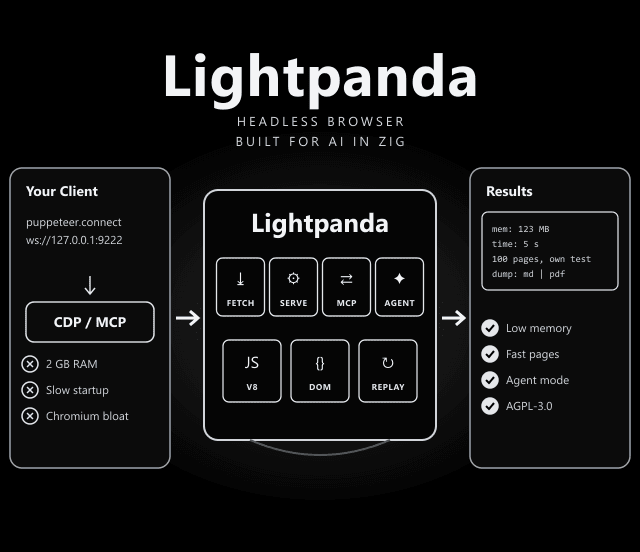
Headless Chrome was built for people. Lightpanda was built for machines.
A new browser written from scratch in Zig, with V8 for JavaScript. It speaks the Chrome DevTools Protocol, so Puppeteer and Playwright can connect, and it adds an MCP server and an agent mode for AI workflows.
Ways to Use Lightpanda
One binary, several modes, according to the README:
Load a URL and dump it as HTML, Markdown, PNG, PDF or structured data (JSON-LD, OpenGraph, meta tags).
Run a CDP server (default) or WebDriver BiDi server for Puppeteer, Playwright and other clients.
Expose the browser as an MCP server over stdio or HTTP, with isolated or shared sessions per agent.
Drive the browser with plain-English tasks, then /save the session as a replayable PandaScript.
Replay a saved PandaScript deterministically, with no LLM and no tokens at runtime.
The Benchmark, Read Carefully
Lightpanda's own test: 933 real web pages requested over the network on an AWS EC2 m5.large. Figures below are for 100 pages.
| Metric | Lightpanda vs Headless Chrome |
|---|---|
| Peak memory | 123 MB vs 2 GB, about 16x less |
| Execution time | 5 s vs 46 s, about 9x faster |
| Who measured it | The Lightpanda team; benchmark details are in the lightpanda-io/demo repository |
Platforms & Install
| Platform | How |
|---|---|
| Linux (x86_64, aarch64) | Nightly binary from GitHub Releases; needs glibc 2.35+ (x86_64) or 2.38+ (arm64), so not Alpine/musl |
| macOS (Apple Silicon, Intel) | Nightly binary, or brew install lightpanda-io/browser/lightpanda |
| Docker | docker run -d --name lightpanda -p 127.0.0.1:9222:9222 lightpanda/browser:latest |
| Windows | No native binary: install inside WSL2 using the Linux steps |
| Nix / Arch | nix run github:lightpanda-io/browser -- --help · yay -S lightpanda-nightly-bin |
Run the CDP Server
docker run -d --name lightpanda -p 127.0.0.1:9222:9222 lightpanda/browser:latest
Then connect Puppeteer with puppeteer.connect({ browserWSEndpoint: "ws://127.0.0.1:9222" }). The rest of your script stays the same. Binding to 127.0.0.1 keeps the browser off your network.
./lightpanda fetch --obey-robots --dump markdown https://example.com
./lightpanda mcp
./lightpanda agent --task "top story on news.ycombinator.com?"
export LIGHTPANDA_DISABLE_TELEMETRY=true
Why a New Browser Instead of a Chromium Fork
A Chromium fork carries everything needed to paint pages for people: compositing, GPU work, fonts and much more. An agent or scraper mostly needs the DOM, JavaScript and the network. Building only that is what lets Lightpanda use far less memory and start fast, which matters when you run many pages at once.
PandaScript: Prototype With an LLM, Ship Without One
In agent mode you describe a task in plain English and the model drives the browser. Run /save to export the session as PandaScript, plain JavaScript with a few browser primitives, then replay it with lightpanda run. The replay is deterministic and uses no tokens, so production jobs do not need a model at all.
Limits to Plan Around
From the README and from what a young browser implies:
- Not every site will work: Lightpanda is a new engine, not Chromium. Test your target pages before swapping it into production.
- Telemetry is on by default: Disable it with LIGHTPANDA_DISABLE_TELEMETRY=true.
- No native Windows or Android: Use WSL2 on Windows; Android/Termux is not supported. Linux builds need glibc, not musl.
- AGPL-3.0: Offering a modified version as a network service can trigger AGPL source-sharing obligations. Check with your legal team.
Anthropic, OpenAI, Gemini, Vertex AI, Mistral, Hugging Face, OpenRouter, Vercel AI Gateway, and local models via Ollama or llama.cpp.
AGPL-3.0. Free to use; read the terms before offering it as a hosted service.
lightpanda.io/docs: MCP server guide, agent mode and PandaScript reference.
Frequently Asked Questions
Can Lightpanda replace headless Chrome in my Puppeteer scripts?
Often, yes. Lightpanda runs a Chrome DevTools Protocol server, so you connect with puppeteer.connect and its browserWSEndpoint. Test your pages first, since Lightpanda is a new browser and may not support every web feature that Chrome does.
Does Lightpanda work on Windows?
Not natively. The README says to install it inside WSL2 using the Linux steps; your automation client can run on Windows and reach it on localhost:9222.
How do I turn off Lightpanda telemetry?
Set the environment variable LIGHTPANDA_DISABLE_TELEMETRY=true. Telemetry is enabled by default.
Can AI agents use Lightpanda directly?
Yes. Run lightpanda mcp to expose it as an MCP server, or use lightpanda agent to drive it with plain-English tasks using models from Anthropic, OpenAI, Gemini, Mistral, OpenRouter or local models.