
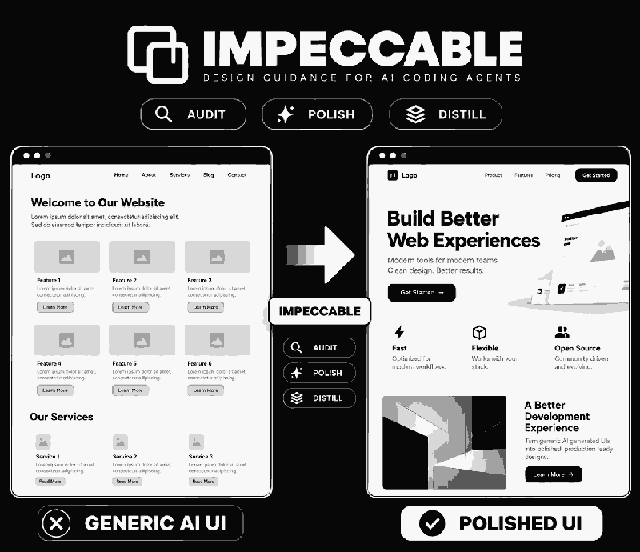
Impeccable: Design Commands and a Slop Detector for AI-Generated Interfaces
Words for what you want, a reviewer, and a detector that catches AI design clichés.
Steer with commands like bolder and polish, review with critique and audit, and catch patterns such as purple gradients and cards nested in cards before they ship.
How a Typical Session Works
Based on the README:
Reads your code, asks only what it cannot infer, and writes PRODUCT.md for later commands.
Optionally captures your existing visual system in DESIGN.md.
For example "/impeccable critique the onboarding flow". Narrow targets give better results.
Scans every UI file the agent edits and reports findings before the agent calls the work done.
The 24 Commands
| Group | Commands |
|---|---|
| Steer | bolder, quieter, distill, colorize, typeset, layout, animate |
| Review | critique (scored UX review), audit (technical quality report, P0 to P3) |
| Finish | polish, harden, clarify, adapt, optimize, onboard |
| Iterate live | live (pick an element in the browser and cycle variants), generate |
| Plan and set up | shape, init, document, extract |
| Deprecated | craft (alias for a plain build request) |
Run the Detector Without an Agent
| Command | What It Does |
|---|---|
| npx impeccable detect src/ | Scan a directory (pattern rules for JSX, TSX and other sources) |
| npx impeccable detect http://localhost:5173 | Scan a rendered page, which enables rules like low contrast and tiny text |
| npx impeccable detect --json . | Machine-readable output |
| npx impeccable detect --github src/ | GitHub Actions annotations |
| npx impeccable detect --list-rules | Every rule with its id and description |
Install (From Your Project Root)
npx impeccable install
The installer detects your coding tools, asks whether to install for the project or globally, and offers the design hook. Reload your tool, then run /impeccable init ($impeccable init on Codex).
npx impeccable update
/plugin marketplace add pbakaus/impeccable
grok plugin install pbakaus/impeccable#plugin --trust
npx impeccable ignores add-value overused-font Inter --reason "Brand font"
Why Agents Need a Design Vocabulary
"Make it pop" leaves the agent guessing. A command like "/impeccable bolder the pricing cards" loads a playbook written for that one move and points it at one target. The README says Impeccable is strongest on interfaces that already exist, iterating one component at a time.
What the Detector Looks For
The rules flag common tells of AI-generated interfaces, such as Inter used everywhere, purple-to-blue gradients, cards nested in cards, gray text on colored backgrounds and an icon tile above every heading, plus quality problems like cramped padding and skipped headings.
Cautions From the README
Worth reading before you turn everything on:
- Live mode is local only: Do not inject it into a deployed site or weaken a production CSP to make it work.
- Apply can run an agent with safeguards off: If no live session is polling, Apply runs the codex or claude CLI with approvals and sandboxing turned off. Review it before using it in an unfamiliar repository.
- Some tools need an extra step: Codex needs the hook approved in /hooks, Grok Build needs /hooks-trust, and Hermes needs the hook plugin enabled.
Claude Code, Cursor, Codex CLI, GitHub Copilot, Gemini CLI, Grok Build, OpenCode, Antigravity, Kiro, Trae, Qoder and more.
Apache-2.0 (per GitHub repository metadata).
impeccable.style/docs, with a page for every command.
Frequently Asked Questions
How do I install Impeccable?
Run npx impeccable install from your project root. It detects your coding tools, asks whether to install for the project or globally, and offers the design hook where supported. Then run /impeccable init in your agent.
Does the Impeccable detector use an AI model?
No. The README says its 62 rules are deterministic, with no LLM and no API key. Source files get the pattern rules; rules that need a rendered page, like contrast and tiny text, run when you scan a URL.
Can I use Impeccable in CI?
Yes. npx impeccable detect works without an agent, can output JSON or GitHub Actions annotations, and exits with code 2 when it finds issues.
Is live mode safe to run on a production site?
No. The README says live mode edits a local checkout only and should not be injected into a deployed site. Its apply step can run an agent CLI with approvals and sandboxing turned off, so review it before use in an unfamiliar repository.