
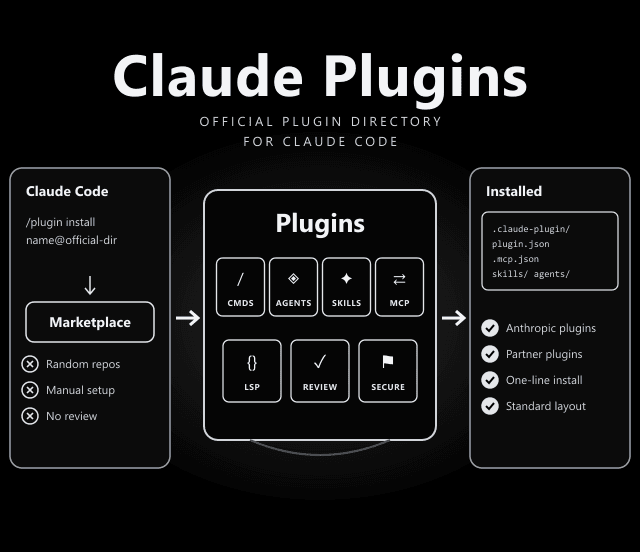
Claude Plugins Official: Anthropic’s Curated Marketplace for Claude Code
The default place to find and install Claude Code plugins.
Plugins bundle slash commands, subagents, skills and MCP servers into one install. This repo holds Anthropic's own plugins plus reviewed plugins from partners and the community.
What Goes Inside a Plugin
Every plugin follows the same structure, per the README:
Required. The plugin metadata.
Optional. MCP server configuration the plugin brings with it.
Optional. Slash commands.
Optional. Subagent definitions.
Optional. Skills (folders with a SKILL.md).
Documentation for users.
What's in the Directory (Selected Plugins)
A sample of plugin names from the repository folders on 18 October 2026, grouped by us. Check each plugin page for details.
| Group | Plugins |
|---|---|
| Language servers (LSP) | typescript-lsp, pyright-lsp, rust-analyzer-lsp, gopls-lsp, clangd-lsp, csharp-lsp, jdtls-lsp, kotlin-lsp, swift-lsp, php-lsp, ruby-lsp, lua-lsp |
| Code quality & review | code-review, pr-review-toolkit, code-simplifier, code-modernization, security-guidance, claude-security |
| Workflow | commit-commands, feature-dev, frontend-design, hookify, ralph-loop, session-report, claude-md-management, claude-code-setup |
| Building extensions | plugin-dev, skill-creator, mcp-server-dev, agent-sdk-dev, example-plugin |
| Output styles | explanatory-output-style, learning-output-style |
| Partner integrations | github, gitlab, linear, asana, playwright, context7, firebase, terraform, serena, laravel-boost, discord, telegram |
Marketplace Rules Worth Knowing
| Rule | What It Means |
|---|---|
| Names are immutable | A published plugin name is a permanent slug. Renaming breaks installs with a plugin-not-found error; use displayName to change the label. |
| Renames map | If a rename is unavoidable, a renames entry in .claude-plugin/marketplace.json migrates existing installs on the next sync. |
| Skill bundles | Repos that ship SKILL.md folders without a plugin.json can be listed with strict: false and an explicit skills array. |
| Skill naming | Each bundled skill registers as <plugin-name>:<skill-name> in Claude Code. |
Install a Plugin From Claude Code
/plugin install code-review@claude-plugins-official
Swap code-review for any plugin name. Prefer browsing? Run /plugin and open the Discover tab.
/plugin
/plugin install typescript-lsp@claude-plugins-official
/plugin install github@claude-plugins-official
See /plugins/example-plugin in the repository
Internal vs External Plugins
Internal plugins in /plugins are developed and maintained by Anthropic team members. External plugins in /external_plugins come from partners and the community and must meet quality and security standards before they are accepted, through a submission form linked in the README.
Why a Curated Marketplace Helps
Without a directory you hunt through random repositories and wire up commands, agents and MCP servers by hand. A marketplace gives one install command, a standard layout, and updates through Claude Code itself, so teams can share the same set of tools.
Trust Before You Install
The README's own warning, in plain terms:
- Anthropic cannot vouch for everything: Anthropic does not control what MCP servers, files or other software third-party plugins include, and cannot verify they will work as intended or will not change.
- Plugins can run code: MCP servers and hooks run on your machine. Read a plugin's homepage and source before installing, especially for external plugins.
- Per-plugin licences: The repository is Apache-2.0, but the README says to check each linked plugin for its own LICENSE.
Anthropic. Internal plugins are built by Anthropic team members; external ones are reviewed submissions.
Apache-2.0 for the repository. Individual plugins may carry their own licences.
Official guide to building plugins: code.claude.com/docs/en/plugins, and plugin marketplaces for the schema.
Frequently Asked Questions
How do I install a plugin from claude-plugins-official?
In Claude Code, run /plugin install followed by the plugin name and @claude-plugins-official, for example /plugin install code-review@claude-plugins-official. You can also browse plugins under /plugin, in the Discover tab.
Are the plugins in this directory safe?
Internal plugins are built by Anthropic, and external plugins must meet quality and security standards to be accepted. The README still advises trusting a plugin before installing, updating or using it, because Anthropic does not control what MCP servers or other software third-party plugins include.
Can I submit my own plugin?
Third-party partners can submit plugins through Anthropic's plugin directory submission form linked in the README. External plugins are reviewed for quality and security before inclusion.
What is inside a Claude Code plugin?
A plugin needs a .claude-plugin/plugin.json metadata file and can add a .mcp.json MCP server configuration, slash commands, agent definitions and skills, plus a README. See /plugins/example-plugin in the repository for a reference implementation.