
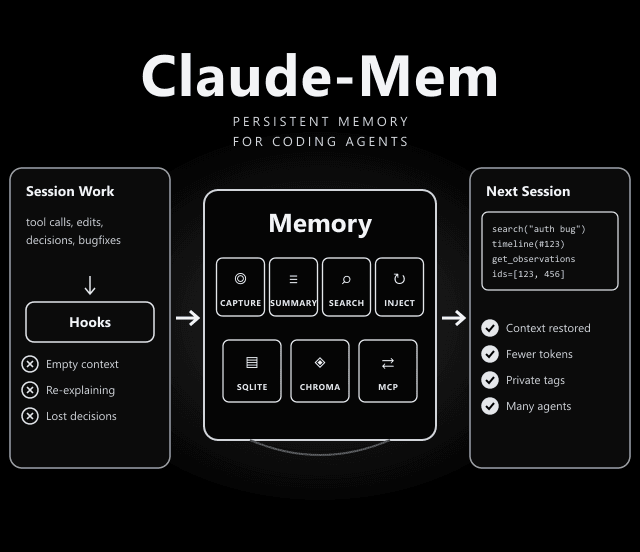
Claude-Mem: Give Claude Code (and Other Agents) Memory That Survives Sessions
Stop re-explaining your project every time you open a new session.
Claude-Mem captures what your agent does, compresses it into summaries, and injects the relevant parts into future sessions. The agent can also search that history on its own.
The 3-Layer Memory Search
Claude-Mem exposes four MCP tools. The README recommends this order to keep token use low:
Get a compact index of matching memories with IDs, about 50–100 tokens per result. Filter by type, date or project.
See what was happening around an interesting result, in chronological order.
Fetch the full details only for the IDs you picked, about 500–1,000 tokens each. Batch several IDs per call.
Core Components
| Component | What It Does |
|---|---|
| Lifecycle hooks | SessionStart, UserPromptSubmit, PreToolUse, PostToolUse, Stop and SessionEnd, each one command run by a small launcher on PATH. |
| Worker service | A local HTTP API with a web viewer and search endpoints, managed by Bun. |
| SQLite database | Stores sessions, observations and summaries, with FTS5 full-text search. |
| Chroma vector DB | Adds semantic search next to keyword search (hybrid retrieval). |
| mem-search skill | Lets you ask questions of your project history in natural language. |
| Web viewer & My Work | Browse memory, sessions and settings; track live requests and a review queue locally. |
Install for Your Agent
Commands from the README. Restart the agent afterwards.
| Agent | Command |
|---|---|
| Claude Code | npx claude-mem install (or /plugin marketplace add thedotmack/claude-mem, then /plugin install claude-mem) |
| OpenCode | npx claude-mem install --ide opencode (OpenCode 1.3.4 or later) |
| T3 Code | npx claude-mem install --ide t3code |
| Antigravity CLI | npx claude-mem install --ide antigravity |
| Pi / DeepSeek Harness | npx claude-mem install --ide pi · npx claude-mem install --ide dsh --dsh-profile tui |
| OpenClaw gateway | curl -fsSL https://install.cmem.ai/openclaw.sh | bash |
Install (Claude Code)
npx claude-mem install
The installer sets up hooks and the worker, then offers a browser sign-in for the hosted memory service. To skip it, pass an explicit --provider flag or set CLAUDE_MEM_ONLINE_OPTIN=false.
/plugin marketplace add thedotmack/claude-mem
/plugin install claude-mem
npm install -g claude-mem
Node.js 20+, Claude Code with plugin support (Bun & uv auto-installed)
Why Progressive Disclosure Saves Tokens
Loading every past observation into context would be expensive and noisy. Claude-Mem gives the agent a cheap index first, lets it look around a promising result, and only then pulls full details for the few memories that matter. The README puts the saving at about 10x compared with fetching everything up front.
Choosing a Memory Provider
After install you choose who generates the summaries: the hosted claude-mem observer (30-day free trial, then it falls back to your Anthropic plan unless you subscribe), your own OpenRouter or Gemini key, or your Anthropic plan. Pick based on cost and on where you are comfortable sending session content.
Privacy & Cost Checklist
Memory tools see a lot of your work. Before you install:
- Hosted by default: The default sign-in path uses the hosted memory service. Choose a local or bring-your-own-key provider if your code must stay in-house.
- Mark secrets: Wrap sensitive content in <private> tags so it is not stored.
- Opt-in extras: Screenshots are off by default; Cloud Sync uploads to cmem.ai only when you enable it.
- Summaries cost tokens: Generating summaries uses a model. After the free trial, that comes out of your plan or your own API key.
<private> tags, opt-in screenshots and Cloud Sync, and a choice of memory provider.
Apache-2.0 (per the GitHub repository metadata).
docs.claude-mem.ai: installation, search tools, configuration, architecture and troubleshooting.
Frequently Asked Questions
How do I install Claude-Mem for Claude Code?
Run npx claude-mem install, or inside Claude Code run /plugin marketplace add thedotmack/claude-mem and then /plugin install claude-mem. The README warns that npm install -g claude-mem installs only the library and does not set up the hooks.
Does Claude-Mem send my code to a server?
It depends on the provider you choose. The installer offers a hosted claude-mem observer with a 30-day free trial, your own OpenRouter or Gemini key, or your Anthropic plan, and you can skip the sign-in with an explicit --provider flag. Cloud Sync and screenshot capture are optional. Read the configuration docs before you use it on private code.
How do I keep secrets out of Claude-Mem?
Wrap sensitive content in <private> tags and it is excluded from storage. Screenshot capture is off by default.
What does Claude-Mem need to run?
Node.js 20 or later and a current Claude Code with plugin support. Bun and uv are installed automatically if missing, and SQLite is bundled.